
Compress Images Online Without Losing Quality (2026 Guide)


Large image files are among the most common reasons websites feel slow. High-resolution photos and graphics look great, but they often have large file sizes that can slow page load times, degrade SEO performance, and frustrate visitors, especially on mobile devices.
The good news is that you do not have to sacrifice image quality to fix this problem. Modern image compression tools can significantly reduce file sizes while keeping images visually sharp. In many cases, optimized images can be 50-80% smaller without noticeable quality loss.
So how can you compress images online without losing quality? The key is using smart compression tools that remove unnecessary data, optimize image formats, and balance file size with visual fidelity. In this guide, you will learn how to compress images online without losing quality to the visible eye.
Try compressing images yourself!
Upload your images and instantly reduce file size without losing quality.
Why image compression matters for websites
Images often make up the largest portion of a webpage’s total size. While high-quality visuals improve design and engagement, unoptimized images can slow down performance and negatively affect the user experience.
Image compression helps reduce file sizes so websites load faster and use less bandwidth. This has several important benefits.
- Faster page load times: Large images take longer to download. Compressing images reduces the amount of data browsers need to load, helping pages appear faster.
- Better SEO performance: Page speed is a ranking factor for search engines. Websites that load quickly tend to perform better in search results and provide a smoother experience for visitors.
- Improved mobile experience: Mobile users often rely on slower network connections. Smaller image files load more efficiently, making your site more accessible on phones and tablets.
- Reduced bandwidth usage: Optimized images consume less server bandwidth, which can lower hosting costs and improve scalability for high-traffic websites.
What does “without losing quality” actually mean?
Many people assume that compressing an image automatically reduces its quality. In reality, modern image compression focuses on reducing file size while maintaining the visual appearance of the image.
Most compression tools work by removing unnecessary data that does not affect how the image looks to the human eye. This allows images to remain visually sharp while using far less storage.
Lossy vs Lossless compression
Image compression generally falls into two categories.
- Lossless compression reduces file size without removing any visual information. The image remains identical to the original, but the file structure is optimized to use less space.
- Lossy compression removes some non-essential image data to achieve much smaller file sizes. Modern algorithms are designed so that the changes are nearly impossible to notice in normal viewing conditions.
Many image optimization tools combine both methods to achieve the best balance between quality and file size.
How to compress images online (Step-by-step)
Compressing images online is simple. Tools like the Tinify image compressor automatically reduce image file sizes while maintaining image quality. You won’t need to install any software or make complex settings adjustments.
1. Go to the Tinify image compressor
Open the Tinify image compressor in your browser. You can start optimizing images right away without creating a complex workflow.
2. Upload your images
Drag and drop your image files into the compressor, or select them from your device. Tinify supports common web image formats, including JPEG,PNG, WebP, AVIF, and JPEGXL (JXL) making it easy to optimize a wide range of visuals.
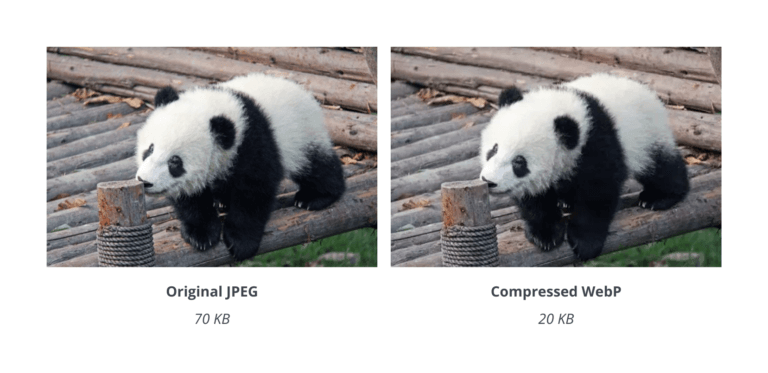
Tip: Convert images to WebP for smaller file size and faster page load. WebP often compresses images better than JPEG and PNG while maintaining high visual quality.
3. Let Tinify compress the images automatically
Once your files are uploaded, Tinify automatically applies smart compression techniques. This process removes unnecessary data and reduces file size while keeping the image visually sharp.
4. Review the optimized results
After compression is complete, you can see how much file size was reduced. In many cases, images become significantly reduced in size without noticeable quality loss.
5. Download your compressed images
Download the optimized images individually or save them all at once. Your new files are now lighter, load faster, and better suited for websites, blogs, email campaigns, and other digital content.
Using Tinify is one of the easiest ways to compress images online without losing quality, especially when you want a fast workflow and reliable results.
Compress images automatically for websites
If you manage a website with many images, compressing files manually can become time-consuming. Automation helps streamline this process.
Automated optimization with APIs
Developers can integrate image compression directly into their workflows. For example, the Tinify API allows websites and applications to automatically compress images during upload, ensuring every image is optimized without manual steps.
The Tinify WordPress plugin uses the same technology to automatically compress images when they are uploaded to your media library, making image optimization easy even without technical knowledge.
Deliver optimized images with a CDN
For websites with many images, a Content Delivery Network (CDN) helps deliver images faster by serving them from locations closer to visitors. The Tinify CDN automatically compresses and delivers optimized images, improving loading speed while maintaining visual quality.
Best practices to compress images without losing quality
Following a few best practices can help you achieve the best balance between image quality and file size.
- Choose the right image format
JPEG works well for photographs, while PNG is better for images that require transparency. - Use modern image formats
Formats such as WebP and AVIF often provide better compression while maintaining high visual quality. Converting images from PNG to WebP can significantly reduce file sizes while preserving transparency, making it a popular option for website optimization. - Resize images before uploading
Avoid uploading images larger than needed. Resize them to match the maximum display size on your website. For WordPress users, the Tinify WordPress plugin automatically resizes and compresses images during upload. - Remove unnecessary metadata
Images often contain metadata such as camera settings, location data, thumbnails, and editing history. Tinify automatically removes unnecessary metadata during compression, helping reduce file size without affecting visual quality. - Use automated compression tools
Tools like Tinify (TinyPNG) automatically optimize images to ensure consistent compression and quality across your website.
Frequently Asked Questions (FAQs)
01. How do I compress images online for free?
You can compress images online for free by uploading them to an online image compression tool. Simply drag-and-drop or upload your images into the image optimizer. The tool will automatically reduce the file size, and you can then download and use the optimized images on your website or other digital platforms.
02. Can I compress images without losing quality?
Yes. The Tinify image compressor uses smart compression techniques that reduce file size while preserving visual quality. In many cases, images can be reduced by 50%-80% while still looking nearly identical to the original.
03. What is the best online tool to compress images for web use?
The best tools combine ease of use with advanced compression technology. Platforms like Tinify (TinyPNG) automatically compress JPEG, PNG, WebP, AVIF, and JPEGXL (JXL) images while preserving visual quality, making them suitable for websites, blogs, and applications.
04. What are the advantages of image compression?
Image compression offers several benefits:
- Faster website loading times
- Improved SEO performance
- Better mobile user experience
- Reduced bandwidth and storage usage
- More efficient website performance overall
By compressing images before publishing them online, you can maintain high-quality visuals while keeping your website fast and efficient.